

What Is a Firewall Policy Audit — and Why It Matters
A firewall policy audit is a systematic review of every rule configured on your firewall to confirm it is still necessary, correctly configured, and aligned with your security and compliance requirements.
Quick answer — what a firewall policy audit covers:
| Component | What Gets Reviewed |
|---|---|
| Rule base | All active, unused, shadowed, and conflicting rules |
| Configuration | Firmware versions, authentication settings, logging |
| Compliance | Alignment with PCI DSS, HIPAA, NIS2, ISO 27001, SOX |
| Change management | Documentation, approvals, and audit trails for rule changes |
| Risk exposure | Overly permissive rules, misconfigurations, missing patches |
Here is why this matters more than most people realize: the average enterprise firewall contains 47% unused rules, 23% shadow rules (rules that can never match traffic), and 12% with direct conflicts. Without regular audits, rule bases grow 15–20% per year — silently expanding your attack surface while slowing down your network.
Most organizations only discover these problems when a compliance auditor finds them first.
I’m Roland Parker, Founder and CEO of Impress Computers, a managed IT and cybersecurity firm serving Houston-area businesses since 1993 — and conducting a thorough firewall policy audit is one of the most impactful security steps I’ve seen businesses overlook. In this guide, I’ll walk you through exactly how to do it right.
Why a Firewall Policy Audit is Critical for Enterprise Security
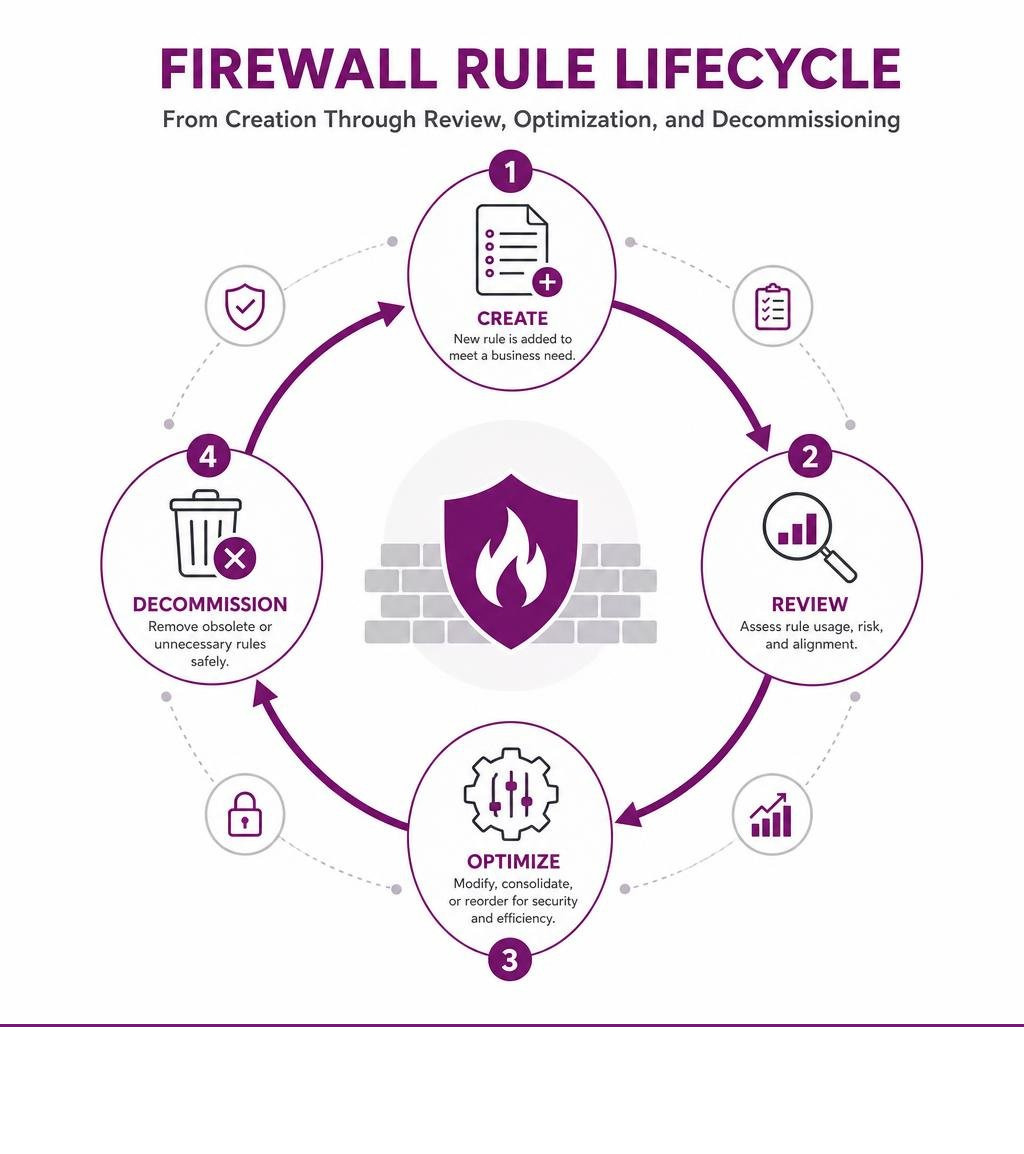
To understand why a firewall policy audit is vital, we must first look at how enterprise firewalls operate over time. When a firewall is first deployed, it has a clean, highly optimized ruleset designed around the principle of least privilege. However, as business needs evolve, new applications are deployed, employees transition, and temporary vendor access is granted.
Each of these operational changes results in new rules being added. Unfortunately, the old rules are rarely removed. This accumulation is known as rule bloat.
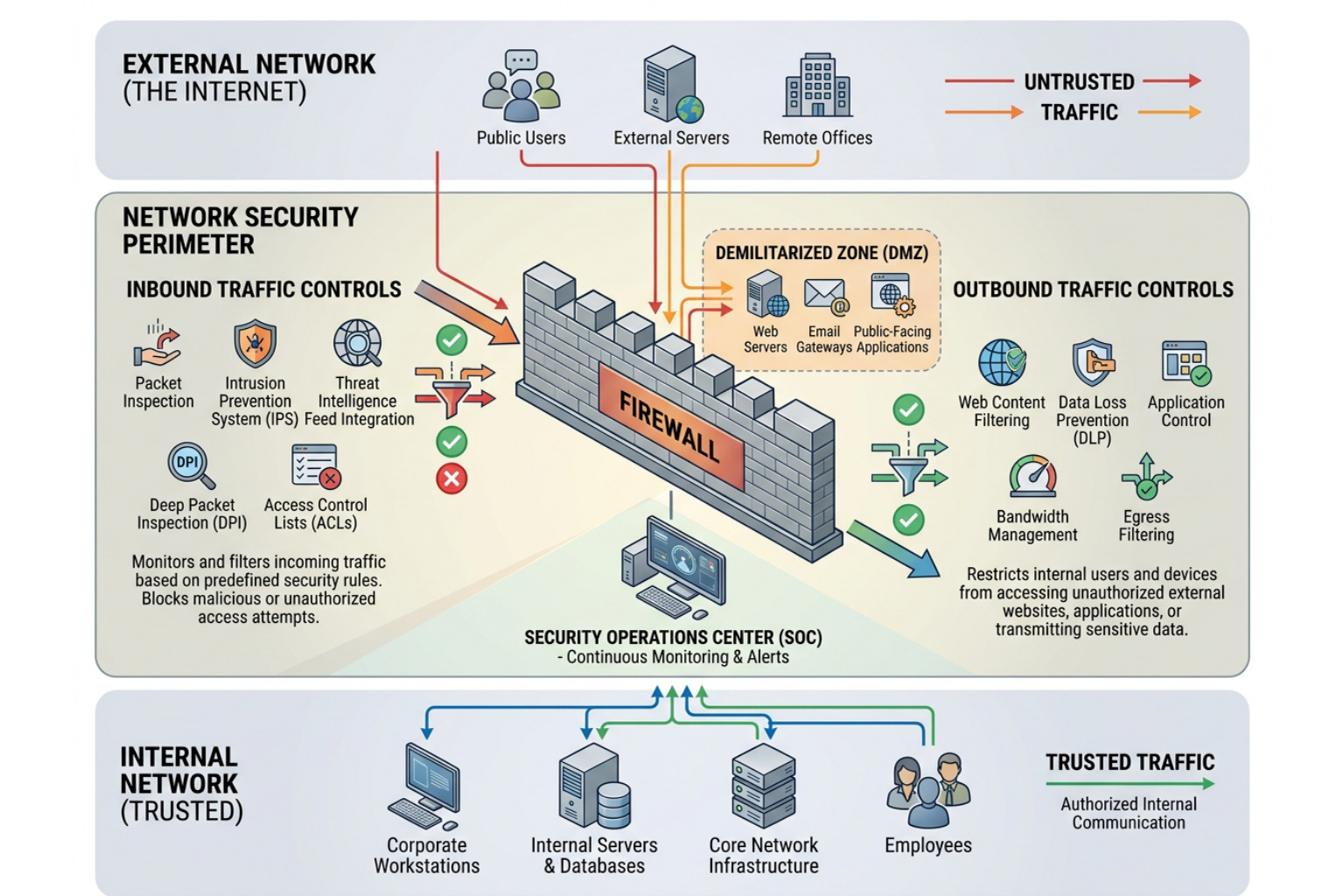
When rulebases grow unchecked, they introduce three primary operational and security hazards:
- Expanded Attack Surface: Every active rule that is no longer required is an open port or an authorized path that a malicious actor can exploit. If a temporary rule was created to allow a third-party developer access via Remote Desktop Protocol (RDP) from an external IP address, and that rule was never decommissioned, it remains a high-priority target for brute-force attacks.
- Degraded Performance: Firewalls process traffic sequentially, evaluating packets against the ruleset from top to bottom. As the size of the rulebase increases, the firewall must perform more CPU-intensive lookups for each packet. Large, unoptimized rulesets can degrade packet processing speeds by 5% to 15%, leading to latency across your entire network.
- Audit and Compliance Failures: Regulatory bodies do not look kindly on unmanaged security infrastructure. Whether your business must comply with financial, healthcare, or retail standards, a messy firewall policy is an immediate red flag that can result in failed audits and costly non-compliance penalties.
We discuss the baseline mechanics of these perimeter defenses in our guide on The Role of Firewalls in Securing Networks. Even if you run a smaller operation, perimeter security is non-negotiable, as detailed in our analysis of Do I Need a Firewall for My Small Business.
Common Vulnerabilities and Rule Bloat in Legacy Configurations
As networks grow, manual oversight of firewall configurations becomes increasingly difficult. Without automated tools, identifying logical errors within hundreds of sequential lines of policy is mathematically challenging. For example, a firewall with 500 rules requires approximately 250,000 pair-wise comparisons to identify all logical conflicts manually.
The table below outlines the four primary policy anomalies that we look for during a firewall policy audit:
| Anomaly Type | Technical Definition | Security & Operational Impact | Example Scenario |
|---|---|---|---|
| Shadow Rules | A rule that is completely covered by a broader rule placed higher in the sequence. | Creates a false sense of security; the shadowed rule never executes. | Rule 10 allows HTTPS to all servers. Rule 50 blocks HTTPS to a specific sensitive database. Rule 50 is shadowed and will never block traffic. |
| Redundant Rules | A rule that replicates the exact access permissions of an existing rule. | Increases rulebase complexity and slows packet processing times. | Rule 12 and Rule 45 both allow SMTP traffic from the mail gateway to the internal mail server. |
| Overlapping Rules | Rules that have partially intersecting criteria, creating ambiguity. | Leads to unpredictable traffic handling and audit documentation gaps. | Rule 15 allows all TCP traffic from a subnet, while Rule 30 allows only port 443 from a specific IP within that same subnet. |
| Conflicting Rules | Rules with identical match criteria but opposite actions (Allow vs. Deny). | Unpredictable security enforcement; the higher rule takes precedence. | Rule 20 allows port 22 from an admin host, while Rule 21 explicitly denies port 22 from the same host. |
To identify these structural anomalies in your own environment, you can run a free diagnostic scan using the NIS2 Readiness Check – Firewall Rule Scanner | FwChange.
Identifying Shadow Rules During a Firewall Policy Audit
Because firewalls process rules sequentially, rule order is everything. Shadow rules are particularly dangerous because they hide vulnerabilities in plain sight.
Consider this real-world example:
- Rule 5 (General): Allow TCP Port 443 from the Corporate Subnet to
Anydestination. - Rule 25 (Specific Security Rule): Block TCP Port 443 from a high-risk testing machine to the Database Server.
Because Rule 5 is evaluated first, any packet from the testing machine destined for the database server on port 443 matches Rule 5 and is permitted. Rule 25 is completely shadowed and will never be evaluated.
Security administrators reviewing the policy might see Rule 25 and assume the database is protected from the testing machine, when in reality, it is completely exposed. During a firewall policy audit, every rule must be cross-referenced with all preceding rules to ensure that security restrictions are actually enforced. You can learn more about the mechanics of policy sequencing on the Firewall Policy Auditing – Firewall Policies (Firewall (computing)) – OWASP10 resource page.
Resolving Overly Permissive Rules and Misconfigurations
Another common finding in legacy firewalls is the presence of overly permissive rules, often characterized by the use of Any in the Source, Destination, or Service fields. These rules are frequently created during troubleshooting phases to rule out the firewall as a connectivity barrier, but they are rarely restricted afterward.
Allowing unrestricted outbound access (Any source to Any destination on Any service) makes data exfiltration trivial for an attacker who has compromised an internal endpoint.
To mitigate this risk, organizations must transition toward a Zero Trust model. This approach ensures that no user or device is trusted by default, even if they are inside the network perimeter. We assist businesses in implementing these strict application and network controls through advanced tools, which we detail in our guide on ThreatLocker Zero Trust: Stop Zero-Day Exploits Before They Start.
A Step-by-Step Guide to Conducting a Firewall Policy Audit
Conducting a thorough audit does not have to be an overwhelming manual chore. By breaking the process down into structured phases, your IT team can systematically clean up configurations and satisfy compliance requirements.

This framework is adapted from industry best practices, including the How to Perform a Firewall Audit: Policy Rules Review Checklist – Tufin.
Establishing the Scope and Baseline of Your Firewall Policy Audit
Before analyzing individual rules, you must establish a clear scope and compile all necessary documentation.
- Identify and Catalog All Devices: Locate every physical, virtual, and cloud-hosted firewall within your network.
- Collect Current Configurations: Export the active configuration files in a structured format (such as JSON, XML, or CSV) rather than raw command-line interface (CLI) text.
- Baseline Your Rule Count: Record the total number of active rules on each device. This serves as your benchmark to measure rule cleanup efficiency.
- Gather Change Management Logs: Retrieve the historical change requests and approvals associated with your firewall policies.
- Map Network Zones: Clearly define your network zones (e.g., DMZ, Internal Corporate LAN, Guest Wi-Fi, Cardholder Data Environment) and verify that your documentation uses designated test IP ranges for testing validations.
Analyzing Rulesets and Verifying Compliance Frameworks
Once your baseline is established, you must evaluate your rulesets against the regulatory frameworks that apply to your industry.
- PCI DSS 4.0 (Requirement 1): Mandates that multi-vendor firewall configurations are actively managed, with documented business justifications for every open port and service. It also requires a formal review of all firewall rulesets at least once every six months. Learn more about the PCI Security Standards Council.
- HIPAA (§ 164.312): Requires strict access controls to protect Electronic Protected Health Information (ePHI). Firewall policies must segment healthcare databases from public networks and log all access attempts. Read the official HHS HIPAA Security Rule guidelines.
- ISO/IEC 27001:2022 (Annex A.8.20 & A.8.22): Focuses on network security management and network segregation, requiring organizations to prove that their firewall rules align with documented security policies. Visit the ISO 27001 Official Page.
- NIS2 Directive: Applies to critical infrastructure and digital service providers in the EU (and global partners), mandating strict risk management and reporting.
To streamline this verification process across different compliance requirements, organizations often use specialized compliance software. You can explore how automation maps these requirements directly to your ruleset with the Firewall compliance auditor – AlgoSec.
Automation Tools and Modern Solutions for Rule Cleanup
For modern hybrid networks, manual spreadsheet audits are no longer practical. The complexity of managing rules across on-premises hardware, virtual appliances, and public cloud security groups requires automated solutions.
Fortunately, several tools are available to help automate policy analysis and cleanup:
- Open-Source Command Line Tools: For system administrators who prefer a lightweight, code-based approach, the open-source repository lhenry-dev/firewall_audit provides a Rust-based command-line utility. It allows you to audit rules against customizable YAML criteria and export findings to HTML, JSON, or CSV.
- AI-Powered Policy Analysis: The project vahagn-madatyan/PolicyFoundry uses local or cloud-based Large Language Models (LLMs) to analyze traffic exports and VPC flow logs. It generates risk-assessed firewall rule proposals and structured change request forms.
- Enterprise Policy Management: For comprehensive visibility across multi-vendor hybrid environments, the Firewall Policy Analyzer | FireMon provides real-time policy violation alerts, automated rule cleanup suggestions, and continuous compliance reporting.
Frequently Asked Questions About Firewall Audits
How often should an organization perform a firewall policy audit?
At a minimum, organizations should perform a comprehensive firewall policy audit annually. However, compliance frameworks like PCI DSS require ruleset reviews every six months.
For highly active network environments with frequent deployments, we recommend a quarterly review cadence. Additionally, an audit should be triggered by major network events, such as:
- Migrating workloads to a public cloud environment.
- Integrating networks after a corporate merger or acquisition.
- Detecting a security incident or unauthorized network change.
What are the consequences of failing a firewall compliance audit?
Failing a compliance audit can have severe financial and operational consequences, including:
- Regulatory Fines: Non-compliance with HIPAA or PCI DSS can result in significant financial penalties.
- Loss of Payment Processing Privileges: Merchants who fail PCI DSS audits may lose their ability to process credit card transactions.
- Increased Vulnerability to Breaches: A messy ruleset leaves security gaps that attackers can exploit to access sensitive data.
When a breach does occur due to a misconfiguration, the recovery process can be long and costly. We outline how to protect your organization from these scenarios in our guide on how to Protect Your Business from Long Recovery Times Caused by Cyber Attacks.
How can automation reduce the time spent on firewall audits?
Manual firewall audits can take weeks of engineering time, requiring administrators to manually trace connections and interview application owners to justify individual rules.
Automation tools streamline this process by:
- Automatically identifying unused, shadowed, and conflicting rules.
- Generating audit-ready compliance reports in minutes.
- Providing a clear change management history for every rule.
Conclusion
A firewall policy audit is not just a regulatory requirement; it is a fundamental practice for maintaining a strong network security posture. By systematically identifying shadow rules, removing redundant configurations, and enforcing the principle of least privilege, you can protect your organization from external threats and optimize network performance.
Maintaining continuous audit readiness requires a combination of strict change control, automated policy analysis, and regular reviews. Implementing these security measures also helps protect your business from other common attack vectors, such as email-based threats, which we cover in our guide to Reduce the Risk of Business Email Compromise Attacks.
If your IT team does not have the time or specialized tools to conduct these deep-dive security reviews, we can help. Impress Computers provides expert managed IT and cybersecurity services for businesses throughout the Houston metro area—including Katy, Cypress, Sugar Land, The Woodlands, Richmond, and Rosenberg. We support organizations in the manufacturing, construction, banking, legal, and CPA sectors with our 15-minute response guarantee and 99.9% uptime commitment.
Secure your network with Managed IT Services and schedule your comprehensive firewall policy audit today.
