

Why Managed IT Texas Is a Critical Decision for Every Business in the Lone Star State
Managed IT Texas services give businesses across Dallas, Houston, and beyond a dedicated team to handle everything from daily helpdesk support to cybersecurity, cloud management, and compliance — for a predictable monthly cost.
Here’s what Texas businesses typically get from a managed IT provider:
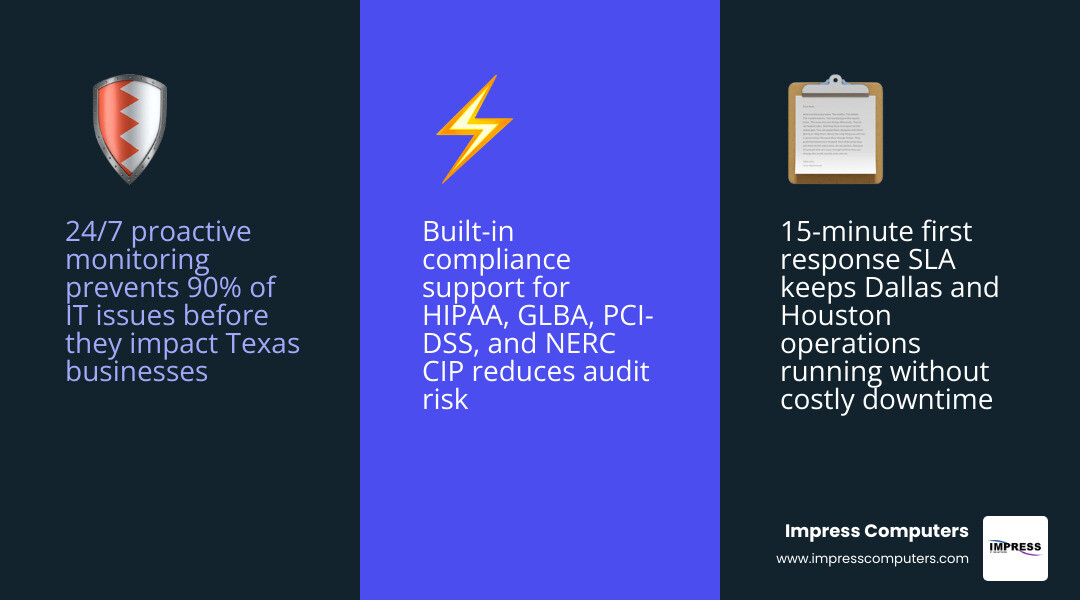
- Proactive monitoring — 24/7 oversight of your network, endpoints, and systems
- Helpdesk support — fast response to IT issues, often under 15 minutes for critical problems
- Cybersecurity — endpoint protection, threat detection, MFA, and vulnerability management
- Cloud services — Microsoft 365, Azure, backups, and virtual desktops
- Compliance support — HIPAA, GLBA, PCI-DSS, NERC CIP, and more
- Disaster recovery — offsite backups, tested recovery plans, and business continuity
- Strategic guidance — vCIO services to align IT with your business goals
Texas is home to some of the most complex business environments in the country — energy operations in Houston, manufacturing floors in San Antonio, law firms in Dallas, and everything in between. Each one carries real IT risk: downtime, ransomware, compliance failures, and weather events like hurricanes that can knock out operations for days.
The right managed IT partner doesn’t just fix problems. It stops them before they start.
I’m Roland Parker, founder of Impress Computers, and I’ve been delivering managed IT Texas businesses rely on since relocating our firm to Houston in 2003 — working closely with manufacturing, construction, banking, legal, and accounting clients who can’t afford downtime or compliance gaps. In this guide, I’ll walk you through everything you need to know to find, evaluate, and get the most from a Texas MSP.
Managed IT Texas word guide:
What Managed IT Texas Includes for Modern Businesses
At a practical level, managed IT Texas means outsourcing day-to-day technology operations to a provider that keeps systems stable, secure, and aligned with your business goals. For most Texas companies, that includes remote monitoring, patching, user support, cloud administration, cybersecurity, backup, disaster recovery, and strategic planning.
It can be fully outsourced or co-managed with an internal IT team. It can also include remote support plus on-site work in locations like Houston, Katy, Cypress, Sugar Land, Fulshear, Brookshire, Richmond, Rosenberg, Missouri City, and The Woodlands.

Core services most Texas businesses buy first
Most businesses start with the basics because the basics keep the lights on:
- Help desk support for employees
- Endpoint management for desktops, laptops, and mobile devices
- Patch management for operating systems and apps
- Microsoft 365 administration
- Network support for firewalls, switches, Wi-Fi, and VPNs
- Vendor management for internet, software, and line-of-business apps
- Asset lifecycle planning for replacements and warranties
- User onboarding and offboarding
These are the services that reduce daily friction. When a new employee starts, their laptop, Microsoft 365 account, permissions, and security settings should be ready before their first coffee. When someone leaves, access should be shut down quickly. Simple in theory. Weirdly chaotic in real life if nobody owns the process.
Security and compliance services bundled into managed IT Texas
Today, cybersecurity is not an add-on. It is part of the core service. That is especially true in Texas industries dealing with regulated data, payment information, or critical infrastructure.
Common bundled protections include:
- EDR and MDR for endpoint detection and response
- MFA across user accounts
- Zero-trust access controls
- Vulnerability scanning and patch validation
- Email filtering and phishing protection
- Security awareness training
- Policy and documentation support
- Log monitoring and incident escalation
For compliance-heavy organizations, managed IT often also supports control mapping and audit readiness for:
- HIPAA in healthcare
- GLBA and sometimes FFIEC-aligned practices in finance
- PCI-DSS for payment environments
- NERC CIP in energy and utility-adjacent operations
- NIST-style security programs for contractors and other regulated environments
If you want a deeper look at how security fits into day-to-day IT support, see our guide on cybersecurity and IT services in Houston.
Cloud, backup, and business continuity capabilities
Cloud support is another major piece of managed IT Texas. Most businesses are somewhere between “we moved to Microsoft 365 years ago” and “we still have one mysterious server everyone is afraid to reboot.”
Typical cloud and continuity services include:
- Microsoft 365 and Azure management
- Cloud migrations
- Virtual desktops and remote access
- Backup monitoring
- Offsite replication
- Disaster recovery planning
- Defined recovery time objectives (RTOs)
- Defined recovery point objectives (RPOs)
- Remote work enablement during outages
For Texas businesses near the Gulf Coast, hurricane readiness matters. That means backups should not live in the same building as the production server, recovery plans should be tested, and teams should know how to work remotely if the office is inaccessible.
We cover this in more detail in The Complete Guide to Managed IT Services Houston TX.
How to Compare Managed IT Texas Providers Across Dallas, Houston, and Beyond
Not all MSPs are built the same. Some are excellent at general support but weak in compliance. Some have strong remote tools but limited field coverage. Some talk a big game and then answer tickets like it’s still 2009.
The best comparison starts with business fit, not buzzwords.
What to look for in a Texas MSP before signing
Before signing an agreement, we recommend checking for:
- A real Texas-based support presence
- On-site support options in your service area
- Clear escalation paths for critical incidents
- Quarterly business reviews or roadmap planning
- Strong documentation standards
- Vendor stack transparency
- Plain-English communication
- Experience in your industry
- Co-managed support if you already have internal IT
A provider should be able to explain what they do without turning every sentence into alphabet soup. If every answer sounds like a firewall had a baby with a spreadsheet, keep asking questions.
Here is a simple selection table you can use internally:
| Criteria | What good looks like | Why it matters |
|---|---|---|
| Local presence | Support coverage in Houston-area cities you operate in | Faster on-site help when needed |
| Response times | Defined first-response and escalation commitments | Less downtime |
| SLA clarity | Uptime, support hours, ticket priorities in writing | Fewer surprises |
| Security maturity | MFA, EDR, backups, monitoring, policy support | Lower cyber risk |
| Industry fit | Experience with your compliance and workflows | Better outcomes |
| Co-managed option | Ability to work with internal IT | More flexibility |
| Strategy support | vCIO, QBRs, budgeting, roadmap guidance | IT aligned to growth |
Pricing models, SLAs, and guarantees explained
Managed IT pricing in Texas usually falls into a few models:
- Per-user pricing
- Per-device pricing
- Flat-rate monthly plans
- Tiered plans with different support and security levels
The right model depends on your environment. A user-heavy office with lots of cloud tools may fit per-user pricing well. A shared-workstation environment may lean toward per-device pricing. Tiered plans can work, but make sure you understand what is and is not included.
Ask about:
- First-response SLA
- Resolution targets
- Uptime commitments
- After-hours coverage
- Onboarding costs and timelines
- Project work versus monthly support
- Security stack inclusions
- Backup testing frequency
When providers talk about SLAs, they are usually referring to a service-level agreement that defines response expectations, coverage, and accountability. We believe these terms should be plain, measurable, and useful. At Impress Computers, we focus on a 15-minute response guarantee and 99.9% uptime because businesses need expectations they can actually plan around.
Why local response matters in Houston, Dallas, Katy, Cypress, and Sugar Land
Local support is not just a nice touch. In many environments, it changes the outcome.
A remote technician can reset a password. They cannot always troubleshoot a failed switch in a wiring closet, replace hardware on a manufacturing floor, or coordinate recovery after a storm impacts a local office.
That is why regional coverage matters for businesses with:
- Multiple branch offices
- Warehouse and plant operations
- On-premise line-of-business systems
- Compliance-sensitive devices
- Jobsite or field connectivity issues
For businesses in Houston and surrounding areas, local response also matters during severe weather events, transportation delays, and office access disruptions. Proximity helps when time is the enemy.
If you are evaluating support options in nearby communities, focus on whether the provider offers local on-site coverage, clear service areas, and proven response capabilities in the Texas locations where you operate.
Industry-Specific Managed IT Texas Needs and Compliance Priorities
Texas businesses are not all solving the same IT problems. A clinic, a bank, a law office, and a manufacturer may all use Microsoft 365, but their risk profiles are wildly different.

Energy, oil and gas, and OT/IT convergence
Energy and oil-and-gas environments often blend traditional business IT with operational technology, remote sites, field connectivity, and industrial control systems. That creates special challenges around network segmentation, visibility, and incident response.
Priority areas often include:
- OT and IT network separation
- Secure remote access to field and plant systems
- Monitoring of remote locations
- Incident response planning for industrial environments
- Zero-trust controls for privileged access
- Alignment to NERC CIP where applicable
These environments cannot treat cybersecurity as a desktop-only issue. A compromised engineer laptop can become a doorway into much more sensitive systems if the environment is poorly segmented.
Healthcare, finance, and legal compliance support
Healthcare providers need HIPAA-aligned safeguards for PHI, access control, device security, backups, and auditability. Financial firms may need GLBA-aligned protections, secure communications, and tighter identity controls. Law firms need confidentiality, document security, retention practices, and secure email.
Common managed services for these sectors include:
- Encrypted email and secure file sharing
- MFA and identity governance
- Audit trails and access logging
- Endpoint hardening
- Backup and retention controls
- Security awareness training
- Policy development and documentation support
For many regulated businesses, passing an audit starts long before the auditor appears. It starts with consistent configuration, documented processes, and fewer exceptions.
Manufacturing, construction, and government requirements
Manufacturing and construction businesses often need a blend of office IT, site connectivity, ERP support, jobsite mobility, and rock-solid uptime. One downed network closet can stop office work. One unstable plant connection can stop production. That is not “an inconvenience.” That is payroll with no output.
We regularly see these priorities:
- Stable plant and office network performance
- ERP and line-of-business application support
- Device standardization
- Jobsite connectivity and secure mobile access
- Backup for critical file shares and production data
- Patch planning that respects production schedules
- Documentation for compliance and insurance requirements
Government and public-sector entities add another layer: procurement rules, reporting expectations, and higher scrutiny on cybersecurity. Texas agencies and local entities also work within state frameworks and contracts for certain managed security services. That makes documentation, incident handling, and risk management especially important.
For manufacturing-specific guidance, visit our article on managed IT support for manufacturing companies in Houston.
The Biggest Benefits of Managed IT Texas for Cost, Uptime, and Strategy
The value of managed services is not “someone answers tech questions.” It is that the entire environment becomes more predictable.
Lower costs and fewer surprises than break-fix IT
Break-fix support looks cheap until you total the hidden costs:
- Emergency labor
- Employee downtime
- Unplanned hardware replacement
- Security gaps
- Tool sprawl
- Vendor finger-pointing
- Lost revenue during outages
Managed services shift IT from surprise spending to a planned operating expense. That makes budgeting easier and often reduces the overhead of trying to build an in-house team with every specialty you need.
It can also consolidate vendors. Instead of separate providers for support, security, cloud, backup, and strategy, one managed partner can coordinate the stack and reduce duplication.
Better uptime, faster support, and stronger security outcomes
The strongest MSP relationships improve operational performance in ways you can measure:
- Faster first response
- Higher first-call resolution
- Better patching discipline
- Broader endpoint coverage
- More reliable backups
- Lower incident frequency
- Shorter outage windows
Across the Texas MSP market, published metrics vary, but the trend is clear: mature providers emphasize 24/7 monitoring, fast critical response, customer satisfaction, and documented issue resolution. Those are the metrics worth asking about.
For our clients, we build around speed and reliability because delayed support is just downtime wearing a tie.
Strategic IT alignment that supports growth
Good MSPs do more than keep systems running. They help you make better technology decisions.
That can include:
- IT roadmaps tied to business goals
- Budget planning
- Cloud readiness assessments
- AI and automation guidance
- Lifecycle planning
- Security maturity improvements
- Quarterly reviews and reporting
This is where IT stops being a cost center and starts acting like a business asset. We have seen companies grow faster when their infrastructure, security, and support model are designed for the next three years, not just the next three tickets.
For more on this bigger-picture approach, read Enhancing Business Operations with Managed IT Services in Houston.
Incident Response, Disaster Recovery, and 2026 Trends Shaping Texas IT
Managed IT in 2026 is not just about fixing printers and updating laptops. It is about resilience, response, and smart use of automation.
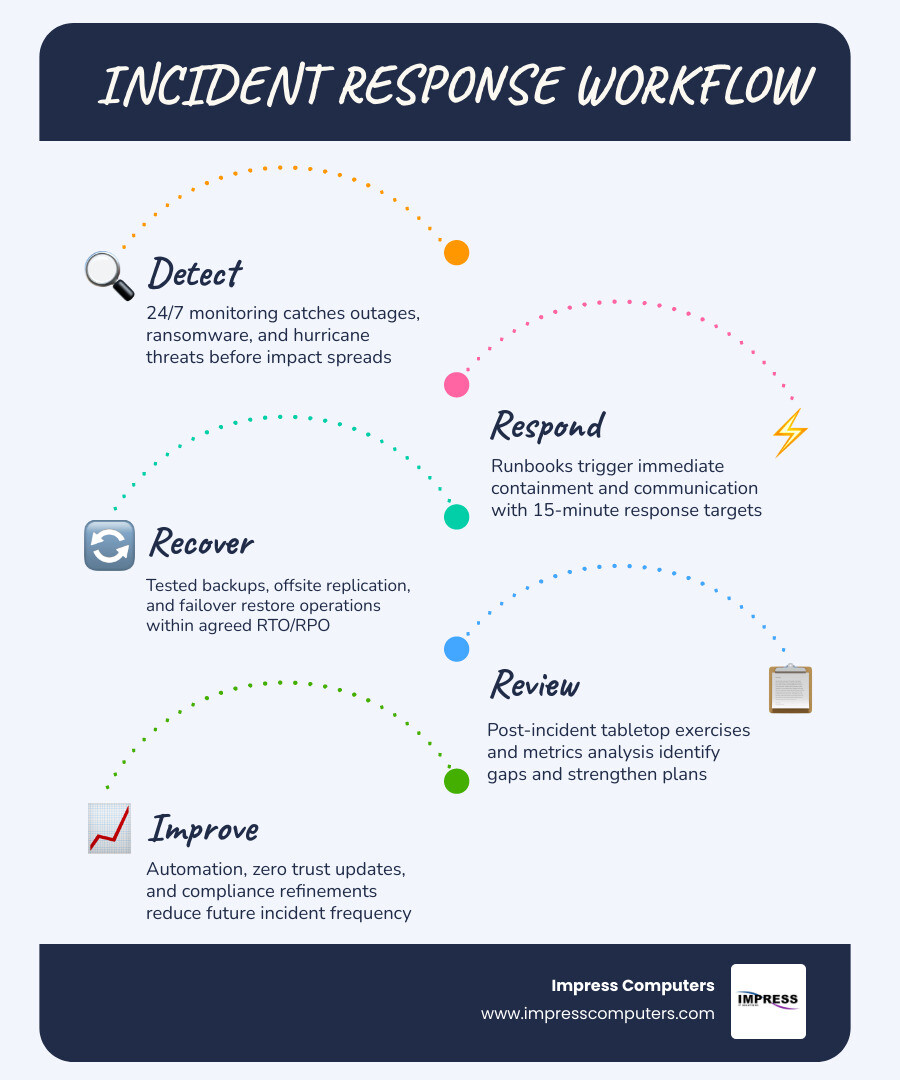
How Texas MSPs prepare for outages, cyberattacks, and hurricanes
A solid Texas managed IT program should include a tested plan for ugly days, not just normal days.
That means:
- Written incident response plans
- Escalation runbooks
- Offline or protected backups
- Offsite replication
- Disaster recovery testing
- Remote work fallback plans
- Internal and external communication plans
- Tabletop exercises
For Gulf Coast businesses, hurricane planning should cover power loss, building access, ISP outages, and staff working from home or alternate locations. Recovery goals should be defined in business language. How long can accounting be down? How much data can you afford to lose? Those are RTO and RPO questions, but the business impact is what really matters.
Emerging trends in managed IT Texas in 2026
Several trends are shaping managed IT Texas right now:
- AI assistants like Copilot entering daily workflows
- SOC automation speeding threat investigation
- Zero-trust architectures replacing broad network trust
- Identity security becoming the new perimeter
- Cloud cost optimization getting more attention
- Compliance automation reducing audit prep pain
- Better data visibility for decision-making
- Increased focus on OT security in industrial sectors
The big shift is this: MSPs are being asked to manage not just infrastructure, but risk, productivity, and change. That is a bigger job than traditional “IT support,” and it requires better process maturity.
Real-world results Texas businesses should ask providers to prove
When comparing MSPs, ask for evidence in numbers, not just adjectives.
Useful proof points include:
- Average first-response times
- Average resolution times
- Customer satisfaction scores
- Endpoint counts under management
- Backup success rates
- Onboarding timelines
- Recovery outcomes after incidents
- Ticket volume and closure trends
- Case studies relevant to your industry
You should also ask what happened during real disruptions. How was ransomware handled? Were backups recoverable? How long did it take to stabilize a new client environment? If a provider cannot answer those questions clearly, that tells you something too.
You can explore our broader perspective on managed IT value in Unlocking Business Potential: The Power of IT Managed Services in Houston.
Frequently Asked Questions About Managed IT Texas
How much does managed IT Texas cost for small and midsize businesses?
Pricing depends on scope. The biggest factors are:
- Number of users
- Number of devices
- Security requirements
- Compliance obligations
- Cloud complexity
- Backup and disaster recovery needs
- After-hours support expectations
- Whether projects are included
In Texas, you will commonly see per-user, per-device, or flat-rate monthly pricing. The lowest sticker price is not always the best value if key protections are excluded. We recommend comparing what is actually bundled, especially security, backup monitoring, and strategic support.
Can a Texas business keep its internal IT team and still use managed IT Texas?
Yes. Co-managed IT is common and often very effective.
In a co-managed setup, the internal IT team keeps ownership of business relationships, internal priorities, and maybe projects, while the MSP adds:
- 24/7 monitoring
- Help desk overflow
- Escalation support
- Cybersecurity tools
- Backup oversight
- Compliance support
- vCIO or fractional leadership
This model works especially well for growing businesses that have one or two in-house IT people but need broader coverage and deeper bench strength.
What certifications and guarantees should a Texas MSP have?
Look for practical capability first, then supporting certifications and guarantees.
Ask about:
- Microsoft expertise and certifications
- Security tool stack and monitoring capabilities
- Experience with HIPAA, GLBA, PCI-DSS, NIST, or other relevant frameworks
- Backup and disaster recovery testing practices
- Response SLAs
- Uptime SLAs
- Documentation standards
- Insurance and incident response process
Certifications matter, but execution matters more. A framed certificate does not recover a server at 2 a.m. A tested process does.
Conclusion
Choosing the right managed IT Texas partner comes down to fit, speed, security, and follow-through. Texas businesses need more than generic support. They need a team that understands local operations, regional risks, compliance demands, and the reality of keeping people productive every day.
At Impress Computers, we provide managed IT support for Houston-area businesses in manufacturing, construction, banking, legal, and CPA environments, with the fast response and high-uptime standards those industries expect. If you want a partner with a 15-minute response guarantee, 99.9% uptime commitment, and local experience across Greater Houston communities, we are here to help.
To learn more or request a quote, visit our managed IT services page.
