

The Business Case for Azure Platform as a Service in 2026
Azure Platform as a Service (PaaS) is Microsoft’s cloud model that lets developers build, deploy, and manage applications without touching the underlying infrastructure. Microsoft handles the servers, operating systems, storage, and security — your team focuses on the code and the business logic.
Here’s what Azure PaaS gives you at a glance:
- What it is: A fully managed cloud environment for building and running applications
- Who manages the infrastructure: Microsoft Azure — not your team
- Core services: Azure App Service, Azure Functions, Azure SQL Database, Cosmos DB, Logic Apps
- Uptime guarantee: 99.99% SLA on Azure App Service
- Pricing model: Pay-as-you-go, with reserved instance discounts up to 72%
- Languages supported: .NET, Java, Node.js, Python, PHP, and more
- Global reach: Available across more than 60 Azure regions worldwide
The demand for this kind of flexibility is real. The global cloud computing market was valued at more than $600 billion in 2023 and is growing at over 20% per year. The PaaS segment alone is worth more than $170 billion — and for good reason. Businesses that used to spend months provisioning servers are now deploying applications in days.
For Houston businesses in manufacturing, construction, or professional services, this shift isn’t just about technology. It’s about staying competitive, reducing downtime, and keeping IT costs predictable.
I’m Roland Parker, founder and CEO of Impress Computers, and I’ve spent over 30 years helping Houston-area businesses build secure, scalable IT infrastructure — including guiding clients through Azure Platform as a Service adoption to eliminate unnecessary overhead and improve reliability. In this guide, I’ll walk you through exactly how Azure PaaS works, what it costs, and how to put it to work for your business.
Understanding Azure Platform as a Service (PaaS)
To understand why we recommend azure platform as a service to our clients in Katy and Houston, it helps to see where it fits in the cloud hierarchy. Think of IaaS (Infrastructure as a Service) as buying a box of parts; you can build anything, but you have to assemble it yourself. SaaS (Software as a Service) is like renting a finished house. PaaS is the “sweet spot” in the middle—it’s like having a fully equipped workshop where the tools, power, and security are all provided, so you can just focus on building your masterpiece.
| Feature | IaaS (Infrastructure) | PaaS (Platform) | SaaS (Software) |
|---|---|---|---|
| Who manages OS? | You (The Customer) | Microsoft Azure | Microsoft Azure |
| Who manages Middleware? | You | Microsoft Azure | Microsoft Azure |
| Who manages Runtime? | You | Microsoft Azure | Microsoft Azure |
| Who manages Data/Apps? | You | You | Microsoft Azure |
| Best For: | Custom configurations | Rapid app development | Ready-to-use tools |
What is platform as a service (PaaS)? It is a complete development and deployment environment in the cloud. It includes everything from the operating systems and middleware to development tools and business intelligence (BI) services. By using Azure’s global infrastructure, businesses in the Houston area can host applications that are accessible from anywhere, whether your team is in The Woodlands, Sugar Land, or working remotely.
Core Components of the Azure Platform as a Service Ecosystem
When we talk about azure platform as a service, we aren’t just talking about one tool. It is a vast ecosystem of interconnected services. Here are the heavy hitters:
- Azure App Service: This is the primary PaaS offering. It allows us to build and host web apps, mobile backends, and RESTful APIs in the programming language of your choice without managing servers.
- Azure Functions: This is “serverless” computing. You write a piece of code that runs only when triggered by an event (like a customer uploading a file). You only pay for the seconds the code is running.
- Azure SQL Database: A fully managed relational database. You don’t have to worry about patching the SQL Server or managing backups; Azure handles the “plumbing” while you handle the data.
- Cosmos DB: A globally distributed, multi-model database service for apps that need lightning-fast response times at a massive scale.
- Logic Apps & Service Bus: These components handle the “glue” between systems. Logic Apps help automate workflows (like sending an alert to your Houston office when a new order is placed), while Service Bus ensures reliable messaging between different parts of your application.
If you are looking for a deeper dive into how Microsoft cloud technologies can specifically benefit your local business, you can explore our Azure resource page.
How Azure PaaS Simplifies Application Deployment
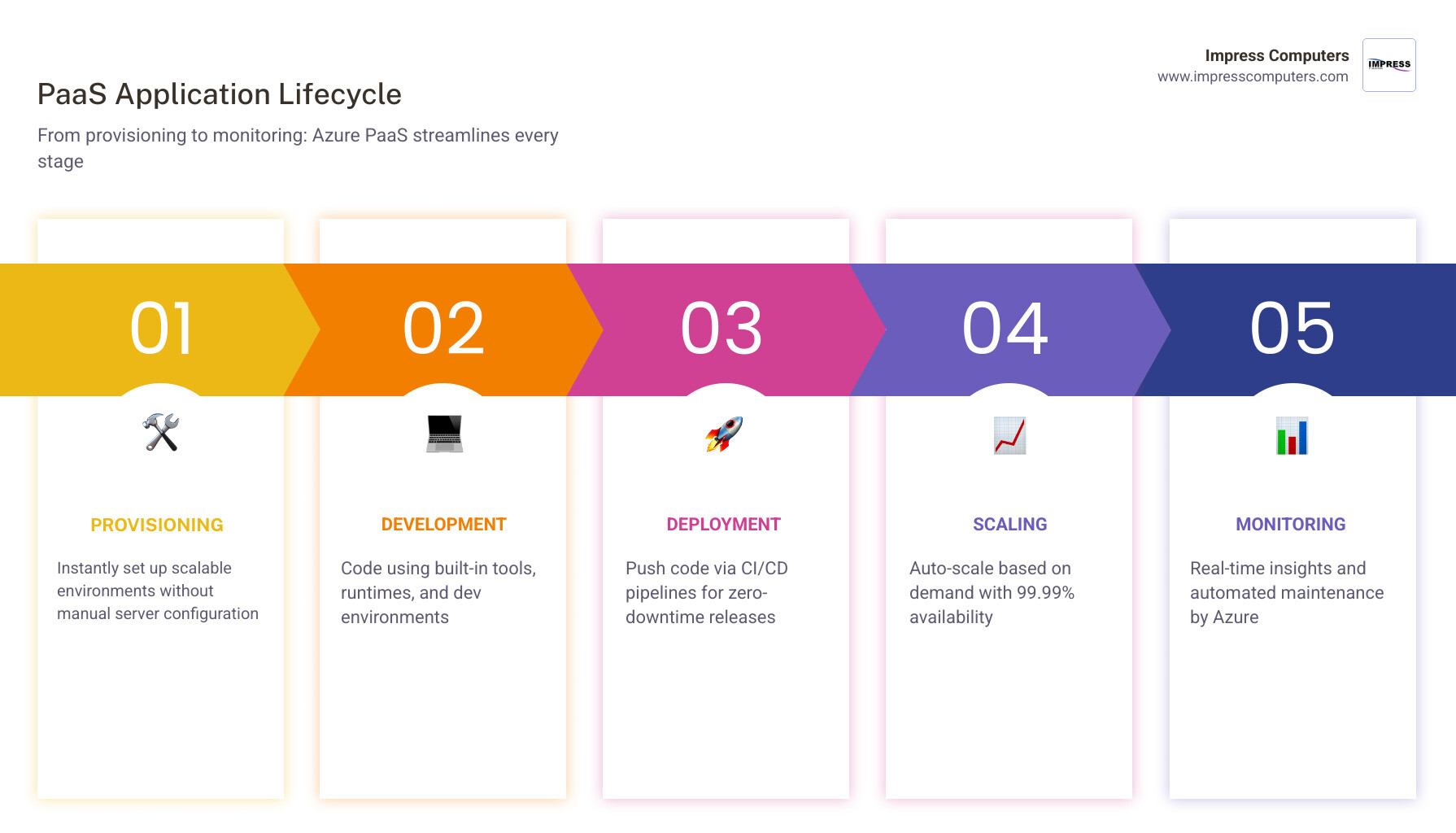
In the old days (which, in tech years, was about five years ago), deploying an application meant buying a server, installing an OS, configuring the web server, and setting up a database. With azure platform as a service, we use automated provisioning.
Instead of manual setup, we use scripts to create the entire environment. This leads to:
- Automated Scaling: If your application suddenly gets a spike in traffic—perhaps during a major construction project in Cypress or a seasonal peak in manufacturing—Azure PaaS can automatically add more “juice” to keep things running smoothly.
- High Availability: Azure guarantees up to 99.99% uptime. Because your app is running on a managed platform, it is naturally more resilient to hardware failures than a single on-premises server.
- Reduced Maintenance: You can stop worrying about security patches for the underlying OS. Microsoft has over 34,000 engineers dedicated to security and infrastructure, so you don’t have to be an expert in server maintenance.
According to the Use platform as a service (PaaS) options documentation, choosing PaaS over IaaS is often the most efficient move for architects because it eliminates the complexity of managing virtual machines (VMs) and attached storage.
Key Benefits of Adopting Azure PaaS for Modern Businesses
For a business owner in Richmond or Rosenberg, the technical jargon matters less than the bottom line. Why should you care about azure platform as a service?

- Financial Predictability: With the pay-as-you-go model, you only pay for what you use. No more massive capital expenditures (CapEx) on hardware that will be obsolete in four years.
- Massive Savings: By using Reserved Instances, businesses can save up to 72% compared to standard hourly rates. If you have a predictable workload, this is a no-brainer.
- Uptime You Can Trust: The 99.99% SLA means your business stays online. For our manufacturing clients, every minute of downtime is lost revenue. Azure PaaS mitigates that risk.
- Distributed Teams: Whether your staff is in Brookshire, Katy, or Fulshear, they can access the development environment and the final applications securely from any location.
The Azure App Service documentation highlights that these platforms support the full application lifecycle: building, testing, deploying, managing, and updating. This “all-in-one” approach significantly reduces the time it takes to get a new product to market.
Accelerating Development with Azure Platform as a Service
One of the biggest advantages we see at Impress Computers is how PaaS speeds up the “idea to execution” phase. Through azure platform as a service, we can implement CI/CD (Continuous Integration and Continuous Deployment) pipelines.
When your developers write new code, it can be automatically tested and deployed to the cloud. Integration with GitHub and Azure DevOps means that updates that used to take hours now take 10 to 15 minutes. This rapid prototyping allows businesses to test new features without committing to a massive infrastructure build-out.
By leveraging Azure Application Services, you gain access to pre-coded components for things like security, directory services, and search, which drastically reduces the amount of new code your team has to write from scratch.
Security and Compliance in the Azure Cloud
Security is the #1 concern for our legal and banking clients in Houston. Microsoft invests more than $20 billion in cybersecurity over five-year periods to ensure their cloud is a fortress.

When you use azure platform as a service, you benefit from a “shared responsibility” model. While you are responsible for the security of your application code and data, Microsoft handles the physical security of the data centers and the security of the underlying platform.
- Zero Trust Architecture: Azure PaaS services have built-in authentication and authorization tools.
- Compliance: With over 100 compliance certifications (including HIPAA for healthcare and SOC for finance), Azure is ready for even the most regulated industries in Texas.
- RBAC (Role-Based Access Control): You can precisely control who has access to what. For example, your manager in Missouri City might have full access, while a contractor in Katy might only have “read-only” permissions.
- Threat Detection: Tools like Microsoft Defender for Cloud provide real-time alerts if suspicious activity is detected in your environment.
For those looking to dive into the technical side of identity management, the Azure Active Directory Authentication Guide is an excellent resource for understanding how to secure modern web applications.
Future Trends: AI, Serverless, and Containerization
As we move through 2026, azure platform as a service is evolving rapidly. We are seeing a massive shift toward “Agentic AI”—applications that don’t just provide information but can actually perform tasks.
- Azure OpenAI Integration: You can now build AI-powered chatbots and analysis tools directly into your App Service apps using managed identities for secure access.
- Serverless GPUs: For businesses doing heavy data lifting or AI model training, Azure now offers serverless GPU compute, meaning you only pay for the high-performance hardware while your model is actually processing.
- AKS Automatic: If you use containers (a way to package code so it runs the same on any machine), Azure Kubernetes Service (AKS) Automatic now handles the scaling and management of those containers for you.
- Low-Code Development: We are seeing more businesses use PaaS to host low-code applications, allowing non-developers to build powerful business tools with minimal training.
As noted on the Azure App Service page, the goal is to allow you to innovate with AI and open-source technology without the headache of managing the cloud infrastructure yourself.
Frequently Asked Questions about Azure PaaS
Is Azure App Service considered PaaS or SaaS?
Azure App Service is a PaaS (Platform as a Service) offering. While it provides a managed hosting environment (like a SaaS), it gives you full control over the application code and configuration. You aren’t just “using” a piece of software like Outlook; you are “building” your own software on top of Microsoft’s managed platform.
How does Azure PaaS differ from serverless computing?
The lines are blurring, but generally, PaaS (like App Service) provides a platform for applications that run continuously. Serverless (like Azure Functions) is event-driven. In a PaaS model, you typically pay for an “App Service Plan” (a set amount of compute power). In serverless, you pay strictly for the execution time of a specific function.
What programming languages are supported on Azure PaaS?
Azure is incredibly flexible. It natively supports:
- ASP.NET / .NET Core
- Java
- Node.js
- Python
- PHP If you have a unique requirement, you can also run Custom Containers (Linux or Windows), which allows you to bring almost any language or runtime to the Azure platform.
Conclusion
Navigating azure platform as a service can feel like a full-time job, but you don’t have to do it alone. At Impress Computers, we specialize in taking the complexity out of the cloud for businesses across Houston, Katy, Sugar Land, and The Woodlands.
Whether you are in manufacturing and need a scalable way to track inventory, or a CPA firm in Houston TX looking to secure client data, we provide the managed IT support you need. We stand by our 15-minute response guarantee and our commitment to 99.9% uptime.
The cloud is no longer the “future”—it is the present. By deploying smarter with Azure PaaS, you can reduce your overhead, increase your security, and give your team the tools they need to grow.
If you’re ready to see how the cloud can transform your operations, read more about Leveraging Azure SharePoint and IT Managed Services for Business Growth in Houston or reach out to us today for a consultation. Let’s build something great together.
