

Why Every Houston Business Running Palo Alto Needs a Firewall Audit
A palo alto firewall audit is a structured review of your Palo Alto Networks firewall’s configurations, rules, and activity logs to find security gaps, fix misconfigurations, and verify compliance with standards like PCI DSS and NIST.
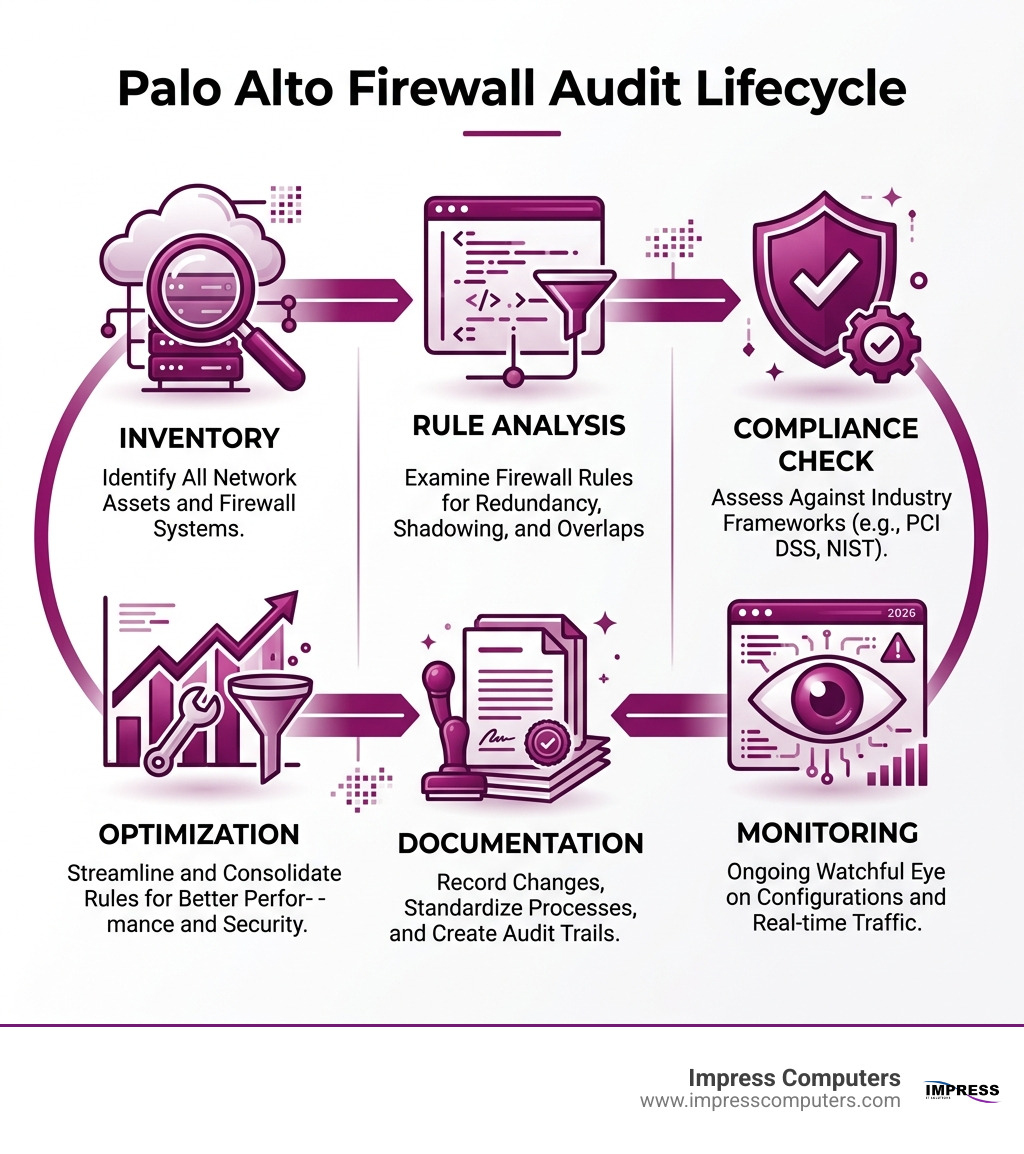
Here’s what a Palo Alto firewall audit covers:
- Rule base review — identify redundant, shadowed, and orphaned firewall rules
- Configuration change tracking — compare versions using Config Audit (Change Summary or XML Diff)
- Administrator activity monitoring — track who changed what and when via audit logs
- Compliance verification — align firewall policies with PCI DSS, HIPAA, NIST, and other frameworks
- Performance optimization — reorder and consolidate rules to reduce latency
- Security gap analysis — uncover underutilized features and misconfigured policies
Palo Alto Networks makes some of the best next-generation firewalls (NGFWs) on the market. But even the best firewall can quietly become a liability.
Rules get added over time. Old ones never get removed. Someone makes a change during an incident — and never documents it. Before long, your firewall is a tangle of outdated policies, shadowed rules, and configuration drift that no one fully understands.
That’s not a hypothetical. Misconfigured policies and underutilized NGFW features are among the most common ways organizations expose themselves to threats — even when they’re running best-in-class hardware.
For businesses in Houston’s manufacturing, construction, legal, and financial sectors, the stakes are especially high. Compliance requirements are real. Downtime is expensive. And attackers don’t care how reputable your firewall vendor is if your rules haven’t been reviewed in two years.
I’m Roland Parker, founder and CEO of Impress Computers, and I’ve spent over 30 years helping Houston-area businesses secure their networks — including guiding clients through palo alto firewall audit processes that surface hidden risks and bring configurations back into compliance. In this guide, I’ll walk you through exactly how to approach a Palo Alto audit, whether you’re doing it manually or with automation tools.
Why a Palo Alto Firewall Audit is Essential in 2026
In April 2026, the digital landscape for Houston businesses is more complex than ever. We aren’t just dealing with simple viruses anymore; we’re facing sophisticated, automated campaigns targeting firewall gateways. If you haven’t looked under the hood of your Palo Alto appliance lately, you might be surprised at what’s accumulated.
Regularly auditing your firewall isn’t just a “nice to have” chore for a slow Tuesday. It is a critical component of risk mitigation. When we perform a palo alto firewall audit, we are essentially ensuring that the digital “locks” on your doors still fit the keys you’ve handed out. Over time, The Role of Firewalls in Securing Networks evolves, and your configuration must evolve with it to remain effective.
Ignoring these checks leads to configuration drift—the slow, messy process where your firewall’s actual settings move away from your intended security posture. This is why The Importance of Regular IT Audits cannot be overstated. An audit brings everything back to a known-good baseline, ensuring that your high-performance Palo Alto hardware is actually doing the job you paid for.
Identifying Security Risks and Misconfigurations
The biggest threat to your network usually isn’t a master hacker in a dark room; it’s a rule created in 2023 that was never deleted. During an audit, we look for several specific types of “rule rot”:
- Shadowed Rules: These are rules that will never be triggered because a rule higher up in the list matches the same traffic. They create confusion and can hide security gaps.
- Orphaned Rules: Rules tied to applications, users, or IP addresses that no longer exist on your network.
- Overly Permissive Rules: Rules that allow “Any” traffic where they should be specific.
By cleaning these up, we enforce the principle of least privilege. This ensures that users and applications only have access to what they absolutely need. This approach is a cornerstone of a modern security strategy; you can Protect Your Data and Network by Using Zero Trust by ensuring your firewall rules are as granular as possible.
Compliance and Performance Benefits
For our clients in the banking and legal sectors in Katy and Sugar Land, compliance is the “big stick” that makes auditing mandatory. Whether it’s PCI DSS for credit card data or HIPAA for medical records, auditors want to see documented proof that your firewall rules are reviewed and optimized.
Using the NIST framework as a guide, we help businesses transition from reactive “firefighting” to proactive exposure management. Beyond security, there’s a significant performance perk: a clean rule base processes traffic faster. By reordering rules so that the most frequent traffic matches are at the top, we reduce the “computational tax” on the firewall, lowering latency for your users.
Leveraging Native Tools for Your Palo Alto Firewall Audit
You don’t always need expensive third-party software to start your audit. Palo Alto Networks has built some fantastic tools directly into PAN-OS and Panorama.

The primary tool for tracking what has changed is the Device > Config Audit feature. This allows us to compare two different configuration versions side-by-side. It’s like “Track Changes” in Microsoft Word, but for your network security.
Using Native Features for a Palo Alto Firewall Audit
One of the most powerful updates in recent years (introduced in PAN-OS 10.1 and refined since) is the enhanced Audit Tracking for Administrator Activity. This feature is a lifesaver when you need to know why a certain change was made.
Every time an administrator navigates the web interface or runs a CLI command, the firewall can generate a log.
- Web Interface Tracking: If an admin clicks “Objects” and then “Addresses,” the system generates two separate logs.
- CLI Tracking: Operational commands are recorded in real-time.
- Syslog Forwarding: These logs can be forwarded to a syslog server for long-term storage and compliance reporting.
This level of detail is essential for identifying compromised accounts. If an admin account suddenly starts poking around sensitive policy areas at 3:00 AM, Audit Tracking for Administrator Activity will catch it.
Best Practices for a Palo Alto Firewall Audit of Rules
When you dive into the actual audit, keep these technical constraints in mind:
- The 25MB Limit: The “Change Summary” tool, which gives you a human-readable list of what was added, deleted, or modified, supports configuration changes up to 25MB. If your configuration is massive (common in large Panorama deployments), you’ll need to use the XML Diff tool instead.
- Visual Cues: When using XML Diff, Palo Alto uses a color-coded system:
- Green: Newly added objects.
- Red: Deleted objects.
- Yellow: Modified objects.
- Object-Level Detail: Don’t just look at the rule name. Click on the Object Name in the Change Summary to see the exact XML snippet of what changed. Sometimes a rule name stays the same, but the underlying IP addresses or ports were altered.
We recommend that businesses in the Houston area Perform a Config Audit at least quarterly to ensure no “unofficial” changes have crept into the system.
Step-by-Step Procedures for Rule Base Optimization
Optimization is where the rubber meets the road. It’s about taking that messy list of 500 rules and turning it into a lean, mean, security machine.

We often start this process with a CyberAudit, which gives us a baseline of the current environment. A key strategy we use for our construction and manufacturing clients is Network Segmentation. By isolating different parts of the business (like the office Wi-Fi from the plant floor controllers), we can write much simpler, more effective firewall rules.
Analyzing and Consolidating Firewall Policies
To optimize your rule base, follow these steps:
- Check Hit Counts: If a rule has a hit count of zero over the last 90 days, it’s a candidate for removal. (Just be careful with “emergency” rules that might only be needed once a year).
- Consolidate Similar Rules: If you have five rules allowing different ports to the same server, consolidate them into a single rule using an “Application Group” or “Service Group.”
- Review Rule Order: The firewall processes rules from top to bottom. If your “Deny All” rule is at the top (it shouldn’t be!), nothing gets through. If your most-used rule is at the bottom, the firewall wastes CPU cycles checking every other rule first.
- Audit Security Profiles: Every “Allow” rule should have a security profile attached (Antivirus, Vulnerability Protection, URL Filtering). An “Allow” rule without a profile is just a hole in your bucket.
There are many Reasons Network Security Should Be a Top Priority, but simply having a firewall isn’t enough—it has to be configured correctly to provide actual protection.
Managing Configuration Drift and High Availability
If you are running a High Availability (HA) pair—which we highly recommend for any business that can’t afford a minute of downtime—auditing gets a little trickier.
Native Config Audits are typically only supported on the active primary peer. If you try to run an audit on the passive secondary peer, you won’t get the full picture.
Furthermore, keep in mind that the built-in audit tool cannot capture “Load” and “Revert” operations. If an admin loads a previous configuration file from a backup, the Config Audit won’t show the individual changes that occurred during that load—it only compares the resulting state to the previous commit. This is why external logging to a syslog server is so vital for a complete audit trail.
Enhancing Audits with Automation and Compliance Scanners
Manual auditing is great for small environments, but as your business grows in Richmond or Rosenberg, you’ll want to look at automation.
| Feature | Manual Native Audit | Automated Compliance Scanner |
|---|---|---|
| Speed | Slow (hours/days) | Fast (minutes) |
| Accuracy | Prone to human error | High (script-based) |
| Historical Data | Limited to stored configs | Extensive historical logs |
| Compliance Mapping | Manual cross-referencing | Automated PCI/NIST reporting |
| Technical Method | Web UI / CLI | XSLT / API Queries |
Modern auditing tools often use XSL Transforms (XSLT) to process the XML data that Palo Alto firewalls spit out via their API. Think of XSLT as a way to query your firewall’s configuration the same way a programmer queries a database. This allows for deep, automated checks that can find things a human might miss, like a slightly misconfigured encryption setting on a VPN tunnel.
At Impress Computers, we believe in Assessment, Consulting, and the Art of Not Getting Hacked. We use these automated insights to give our clients a clear picture of their “exposure management”—not just what’s wrong, but which “wrong” thing is the most dangerous.
Integrating External Security Intelligence
A palo alto firewall audit shouldn’t happen in a vacuum. Your firewall is your first line of defense, but it’s part of a larger ecosystem. In April 2025, we alerted West Houston businesses to a massive login scan campaign targeting firewall gateways.
Auditing helps you ensure that your firewall is configured to block these specific types of threats. This includes:
- Encrypted Traffic Analysis: Ensuring your firewall is actually decrypting and inspecting SSL/TLS traffic (otherwise, threats can just “ride” inside the encryption).
- Credential Theft Prevention: Verifying that your Palo Alto is set up to stop attackers from using stolen passwords to move laterally through your network.
- Threat Intelligence Feeds: Checking that your subscriptions are active and that the firewall is receiving real-time updates from Palo Alto’s global network of sensors.
Frequently Asked Questions about Firewall Auditing
How often should we perform a Palo Alto firewall audit?
At a minimum, we recommend a comprehensive audit once a year. However, if you are in a highly regulated industry (like banking or healthcare) or if you have a high volume of configuration changes, quarterly audits are the gold standard. You should also perform a “mini-audit” after any major network change or security incident.
What is the difference between Change Summary and XML Diff?
- Change Summary is a user-friendly table that shows exactly what changed (e.g., “Admin ‘John’ added Rule ‘Web-Access'”). It is limited to config changes under 25MB.
- XML Diff is a more technical, side-by-side comparison of the raw configuration code. It uses color-coding to show differences and is used for very large configurations where the Change Summary might fail.
Can I audit firewalls in a High Availability (HA) setup?
Yes, but you must perform the audit on the active peer. The configuration is synchronized between the two, but the auditing tools are designed to run on the primary device. Also, “Load” and “Revert” operations aren’t tracked by the native audit tool, so you’ll need to rely on your administrator activity logs for a full history.
Conclusion: Secure Your Houston Business with Impress Computers
A palo alto firewall audit might sound like a daunting technical hurdle, but it is one of the most effective ways to harden your business against modern cyber threats. Whether you are in Brookshire, Cypress, or The Woodlands, your firewall is the gatekeeper of your most precious asset: your data.
At Impress Computers, we don’t just “sell” firewalls. We provide the ongoing expertise needed to keep them running at peak performance. With our 15-minute response guarantee and 99.9% uptime commitment, we help Houston-area businesses in manufacturing, construction, and finance sleep better at night.
Don’t let configuration drift turn your best-in-class firewall into a liability. If you haven’t reviewed your rules lately, it’s time for a professional check-up.
Ready to strengthen your security posture? Learn more about our Managed IT Services and how we can help you master your Palo Alto environment.
