
The Safe Way to Share Files: What Houston Businesses Need to Know
Finding a safe way to share files is no longer optional for businesses — it’s a basic requirement for staying secure and compliant.
Here are the safest methods for sharing files in a business environment:
- End-to-end encrypted cloud services (e.g., Proton Drive) — files are encrypted before they leave your device
- Zero-knowledge transfer tools (e.g., FileShot, SafeTransfer) — the service provider cannot read your files
- Password-protected transfer links with expiration dates — limits who can access files and for how long
- Account-free encrypted transfers (e.g., Fylshare, WorTrans) — no registration required, files auto-delete after delivery
- Enterprise platforms with compliance certifications (SOC 2, HIPAA, GDPR) — required for legal, medical, and financial data
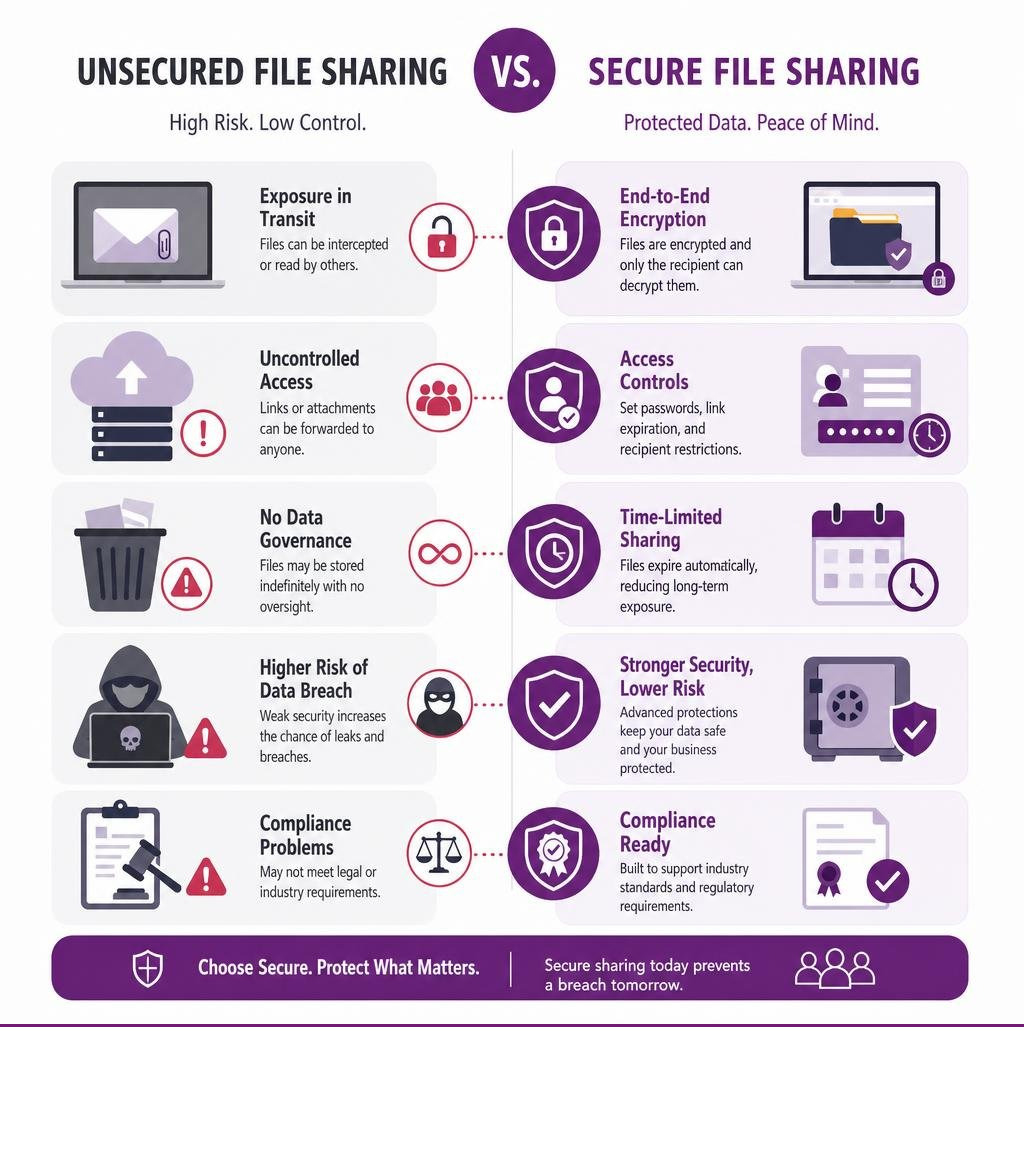
Most businesses don’t think twice about how they share files — until something goes wrong. A contract emailed as an attachment. A client folder shared via a generic Google Drive link. A tax document sent over a messaging app. These habits feel harmless, but they expose sensitive data to interception, unauthorized access, and compliance violations.
The stakes are real. Email attachments cap out at around 25 MB and typically travel without meaningful encryption. Standard cloud storage services may retain your files indefinitely — and their terms of service sometimes allow them to scan that content. For businesses in construction, manufacturing, legal, accounting, or healthcare, a single misdirected file can trigger a compliance breach or a costly data incident.
The good news is that secure alternatives exist — and most are easier to use than the risky habits they replace.
I’m Roland Parker, Founder and CEO of Impress Computers, a managed IT services and cybersecurity firm that has helped Houston-area businesses protect their data since 1993. Over more than three decades of working with organizations in regulated industries, I’ve seen how critical it is to follow a safe way to share files — and what can happen when businesses don’t. In the sections below, I’ll walk you through exactly what to look for and how to put it into practice.
The Core Risks of Traditional File Sharing Methods
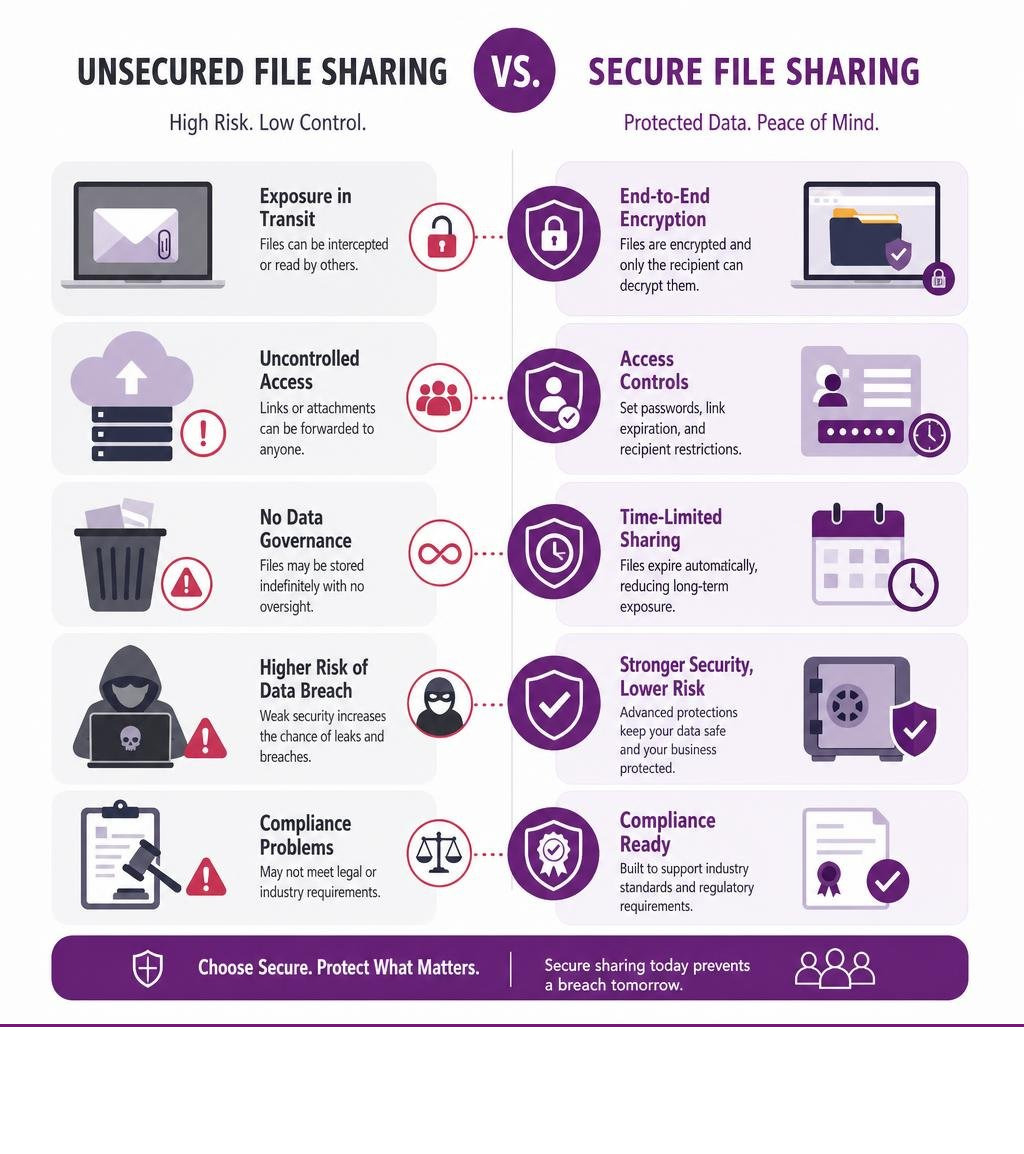
For many businesses in Houston, Katy, and Sugar Land, the daily workflow involves a constant exchange of documents. Unfortunately, the tools we rely on most out of convenience are often the least secure.
Take email attachments, for example. Email was originally designed for open communication, not secure data transit. When you attach a 20 MB PDF containing employee payroll information or a proprietary manufacturing design, that file travels across multiple mail transfer agents in plain text unless both networks have strict, matching transport-level encryption configured. Furthermore, standard email attachments are limited to around 25 MB, which is insufficient for most large files like raw construction blueprints, marketing videos, or databases.
When users hit that 25 MB limit, they often look for the path of least resistance. This usually leads to uploading files to personal, consumer-grade cloud storage accounts or using unmanaged public transfer sites. If you want to dive deeper into this specific risk, we have written an extensive guide on How to Email Files Securely Without the Stress.
Traditional cloud storage services introduce their own set of privacy vulnerabilities. Unlike zero-knowledge systems, standard providers hold the master decryption keys to your data. This means that if their servers are compromised in a data breach, or if an employee’s credentials are leaked, your files are exposed. In some cases, providers even scan file metadata and contents to train machine learning models or index search results.
For businesses handling sensitive financial, legal, or medical records, relying on standard cloud storage is the equivalent of sending a postcard through the mail and hoping no one reads it along the way.
Choosing a Safe Way to Share Files for Your Business
To build a secure workflow in 2026, you must establish a systematic, safe way to share files that balances ease of use with robust security controls. The ideal platform must restrict access to authorized recipients, protect files before and after delivery, and give administrators enough visibility to prove that sensitive data was handled correctly.
When evaluating a secure file sharing solution, businesses should look for the following key requirements:
- Granular Access Controls: The ability to assign specific permissions (view-only, edit, or download) to individual users rather than creating open, public links.
- Zero-Knowledge or Strong Client-Side Encryption: A design where files are protected before they reach the provider’s storage environment, reducing exposure if credentials or cloud accounts are compromised.
- Comprehensive Audit Logging: Track who uploaded, viewed, downloaded, shared, or revoked a file, which is critical for compliance reporting.
- Data Governance and Retention Controls: Use expiration dates, legal holds, data loss prevention rules, and automated cleanup policies so sensitive files do not live forever in forgotten shared folders.
For enterprise-grade secure collaboration, businesses should evaluate platforms such as Egnyte secure file sharing, which combines controlled file access, governance, and administrative visibility for teams that need to share sensitive business documents without losing oversight.
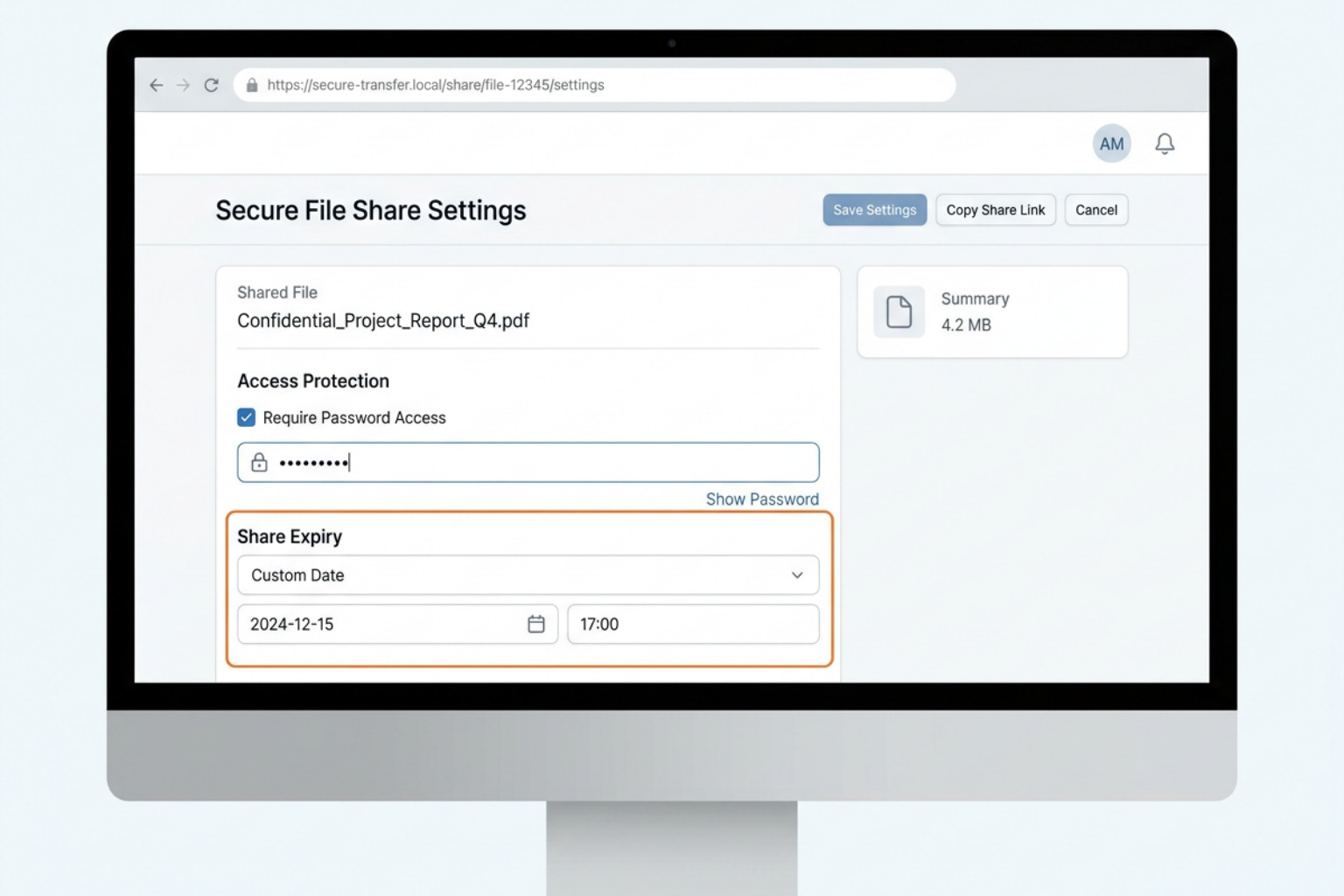
To help visualize the differences between your options, here is a comparison of traditional cloud storage versus secure business file sharing platforms:
| Feature | Traditional Cloud Storage (e.g., Basic Dropbox/Google Drive) | Secure Business File Sharing Platforms (e.g., Egnyte, Proton Drive, FileShot) |
|---|---|---|
| Encryption Key Control | Often controlled by the service provider | Strong encryption, customer-controlled settings, or client-side encryption depending on platform |
| File Retention | Indefinite unless manually deleted | Expiration dates, retention rules, revocation, and governance controls |
| Access Management | Easy to overshare with broad links | User-level permissions, link passwords, expiration dates, and download limits |
| Audit Visibility | Limited on basic plans | Detailed activity logs for compliance and incident review |
| Compliance Fit | Usually insufficient for regulated workflows without configuration | Better suited for HIPAA, SOC 2, legal, financial, and client-data workflows when properly configured |
Why End-to-End Encryption is the Safest Way to Share Highly Sensitive Files
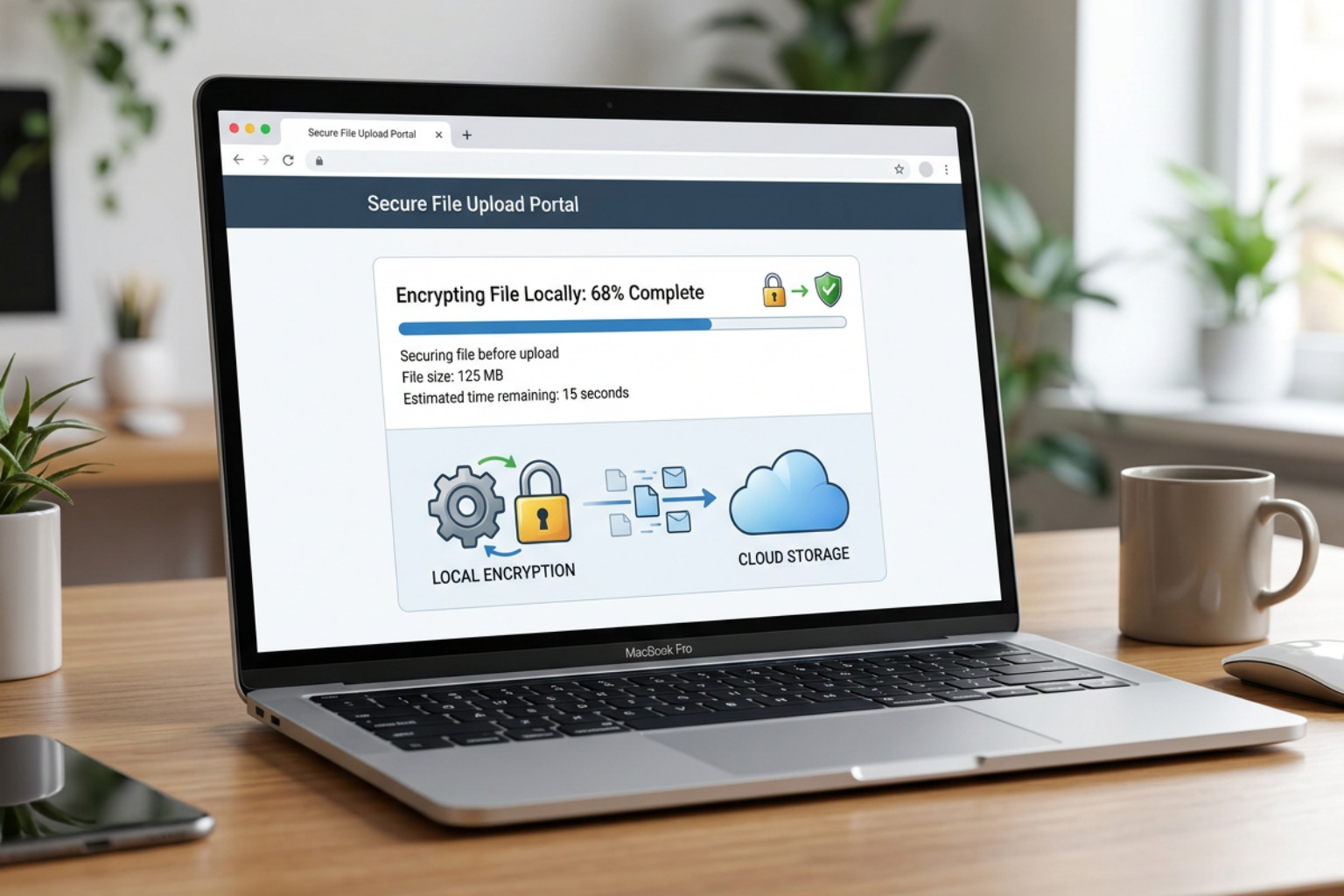
For the most sensitive transfers, end-to-end encryption (E2EE) is the safest option. E2EE ensures that files are encrypted on your local device before they are uploaded to the cloud, and they remain encrypted until the authorized recipient decrypts them on their own device.
The cryptographic gold standard for this process is AES-256-GCM (Advanced Encryption Standard with Galois/Counter Mode). This algorithm provides both high-speed data confidentiality and built-in integrity verification, ensuring that files cannot be tampered with during transit.
When you use client-side encryption tools, the decryption keys never touch the hosting provider’s servers. Instead, they are typically appended to the shareable URL as a “hash fragment” (the portion of the link following the # symbol). Because modern web browsers do not send the hash fragment to the web server during a standard request, the hosting provider remains completely blind to your decryption keys.
Implementing a Safe Way to Share Files in Your Daily Workflow
Securing your file transfers does not require a complete overhaul of your daily routine. By implementing a few simple, disciplined habits, you can dramatically reduce your business’s attack surface.
First, never send a raw, unprotected link via email. If an attacker intercepts the email, they gain instant access to your files. Instead, enforce the following practices:
- Enforce Password Protection: Always protect your shared links with a strong, unique password.
- Use Out-of-Band Delivery: Send the file link via one channel (such as email) and the password via another (such as an encrypted text message or a phone call).
- Set Expiration Dates: Set your transfer links to expire automatically. For one-time transfers, a 24-hour or 7-day limit is ideal.
- Limit Downloads: Configure your links to self-destruct or lock down after a set number of downloads (e.g., 1 or 2 downloads).
- Review Shared Links Monthly: In 2026, stale cloud links are still one of the easiest ways for sensitive data to remain exposed. Assign someone to review active shares and revoke anything that is no longer needed.
For more practical recommendations on securing your files, refer to the 8 tips for secure file sharing – Proton guide.
Advanced Technologies and Compliance Standards for Secure Transfers
For businesses operating in highly regulated fields—such as CPA firms in Katy, medical practices in the Houston Medical Center, or legal firms in The Woodlands—file sharing is heavily governed by compliance standards. Failing to protect client data can result in massive fines under the Health Insurance Portability and Accountability Act or the General Data Protection Regulation.
To meet these strict standards in 2026, modern sharing platforms rely on a mix of encryption, identity controls, policy enforcement, and auditability. By leveraging the browser’s native Web Crypto API, some tools can perform complex cryptographic operations directly in RAM without requiring users to install desktop software. Enterprise platforms add controls such as multifactor authentication, data loss prevention, device trust, ransomware detection, and administrator reporting.
If your business requires a formal, paid platform with robust tracking, Egnyte secure file sharing is a better example than a simple transfer utility because it supports business collaboration, controlled access, governance, and visibility across shared content. For highly sensitive one-off transfers, zero-knowledge options can still be valuable when the primary requirement is ensuring the provider cannot read the file contents.
When selecting an enterprise file sharing platform, you must verify that the provider holds respected security certifications. Look for SOC 2 Type II auditing, which verifies operational security over time, and ISO 27001 certification, the international standard for information security management systems governed by the International Organization for Standardization. If healthcare data is involved, confirm whether the vendor will sign a Business Associate Agreement before any protected health information is shared.
For a complete look at how to structure these secure external workflows, read our practical guide on How to Securely Share Files with External Partners: A Practical Guide for Growing Businesses Powered by Impress IT Solutions.
Frequently Asked Questions About Secure File Sharing
What is the difference between encryption in transit and encryption at rest?
Encryption in transit protects your data as it travels across the internet between your device and the storage server. This is typically achieved using Transport Layer Security (TLS 1.3), which prevents attackers from intercepting your data on public Wi-Fi networks.
Encryption at rest protects your data while it is stored on the physical hard drives in the data center, usually using AES-256. A secure file sharing system must use both types of encryption to ensure that files are never exposed in an unencrypted state.
Do recipients need an account to download securely shared files?
No, most modern secure file sharing platforms allow recipients to download files without creating an account. Services like Dropbox Transfer, Proton Drive, and FileShot generate secure, web-accessible links.
If the sender has applied a password or expiration date, the recipient simply enters the password on the web page to decrypt and download the file directly in their browser.
How can businesses prevent unauthorized access to shared links?
To prevent unauthorized access, businesses should avoid sending static, permanent links. Instead, use temporary links that automatically expire after a few days or after a single download.
Additionally, you should regularly audit your shared links and revoke access immediately once a transaction is complete. For businesses concerned about advanced intercept threats, implementing protection against credential theft and link interception is vital. You can learn more about securing your network endpoints in our guide on Protecting Your Business from Attack Replay.
Conclusion
Finding a safe way to share files is a foundational pillar of modern business cybersecurity. Whether you are transferring sensitive medical records, legal contracts, or proprietary manufacturing designs, relying on standard email or unsecured cloud links is a risk your business simply cannot afford to take.
At Impress Computers, we provide comprehensive managed IT services and advanced cybersecurity solutions tailored specifically for businesses across Houston, Katy, Sugar Land, Richmond, and The Woodlands. We understand the unique compliance and operational challenges faced by the legal, financial, construction, and manufacturing sectors. With our 15-minute response guarantee and 99.9% uptime commitment, we make sure your technology works seamlessly and securely.
If you are ready to eliminate the security gaps in your daily operations and implement a truly Secure File Sharing strategy, our team is here to help. To learn more about how we protect local organizations from emerging threats, take a look at our detailed article on Protecting Your Business: The Role of Impress IT Solutions in Cybersecurity.
Contact us today to secure your business workflows and protect your valuable organizational data.
